September 11, 2026
Everything You Need to Know Before Buying Your First Projector
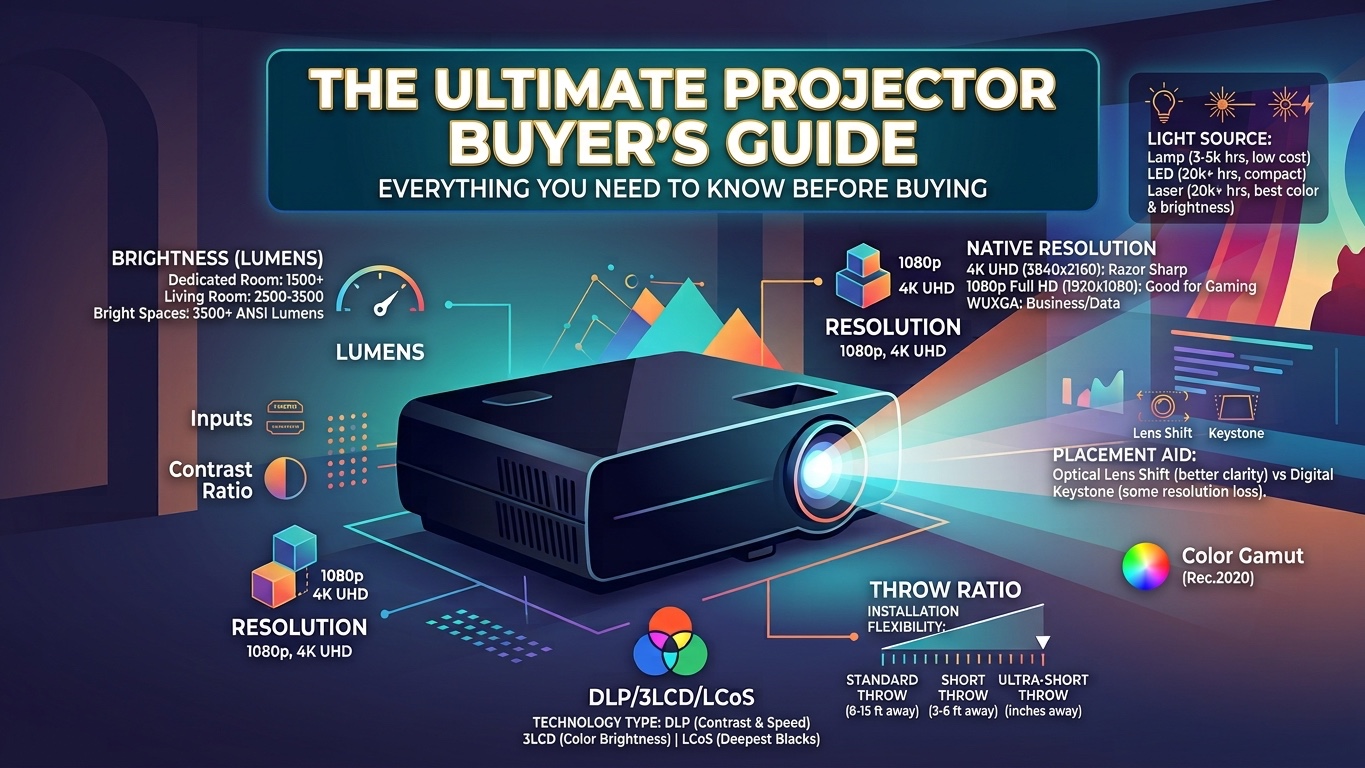
Planning to build your dream home theater or upgrade your office presentation setup? Navigating the technical specifications of modern projectors—from ANSI lumens and throw ratios to DLP vs. 3LCD engines—can feel overwhelming.
In this comprehensive beginner’s guide, we break down the core fundamentals so you can confidently pick the perfect projector for your space and budget.
1. Light Output & Brightness: Understanding Lumens
When shopping for a projector, the first specification you will encounter is brightness, measured in ANSI Lumens. Brightness dictates how vivid your image will look under different ambient lighting conditions in your room.
Dedicated Dark Rooms (1,500 – 2,200 Lumens): Ideal for dedicated basements or cinema rooms with full light control. Lower lumens allow for deeper black levels without harsh glare.
Moderate Ambient Light (2,500 – 3,500 Lumens): Perfect for standard living rooms with ambient lighting or drawn blinds.
Bright Spaces & Offices (3,500+ Lumens): Required for conference rooms, classrooms, or open living areas with unshaded windows to prevent picture wash-out.
2. Resolution & Aspect Ratio
Resolution defines the sharpness and pixel density of your display. Choosing the right one depends on your primary content:
1080p Full HD (1920×1080): Standard 16:9 widescreen format. Great for entry-level home theaters, casual gaming, and budget setups.
4K UHD (3840×2160): The modern gold standard for screens 100 inches and larger. Delivers pin-sharp clarity, vibrant HDR performance, and fine detail.
WUXGA / Business Formats (16:10 or 4:3): Optimized for presentation slides, spreadsheets, and document viewing rather than cinematic movies.
3. Projection Technologies: DLP vs. 3LCD vs. LCoS
How a projector produces images determines contrast, color accuracy, and long-term maintenance requirements:
Technology Key Strengths Best Used For
DLP (Digital Light Processing) Razor-sharp images, fast response times, zero-maintenance sealed optics. Budget home theaters, portable units, sports/gaming.
3LCD High color brightness, no rainbow artifacts, smooth color gradients. Living rooms, bright spaces, office presentations.
LCoS (SXRD / D-ILA) Exceptional contrast ratios, deepest black levels, cinematic film feel. High-end, dedicated home theaters.
4. Placement & Installation Basics
Where you place your projector relative to the screen is determined by its Throw Ratio:
Throw Ratio=
Image Width
Distance from Lens to Screen
Throw Distance Types:
Standard Throw (1.5:1 – 2.0:1): Placed 10–15 feet away for a 100-inch image. Typically ceiling-mounted or placed on a rear shelf.
Short Throw (0.4:1 – 1.0:1): Placed 3–6 feet away. Perfect for compact spaces or temporary setups on a coffee table.
Ultra-Short Throw (UST) (< 0.38:1): Positioned just inches away from the wall on a media console directly beneath the screen.
💡 Pro Tip: Lens Shift vs. Keystone Correction
Always prioritize physical Lens Shift over digital Keystone Correction. Lens Shift optically adjusts the image without reducing resolution, whereas digital keystone compresses pixels and can degrade image sharpness.
5. Choosing a Light Source: Lamp vs. LED vs. Laser
The light engine dictates long-term maintenance costs and bulb replacement cycles:
Traditional Lamps: Lower upfront cost, but require replacement bulbs every 3,000–5,000 hours and need warmup/cooldown periods.
LED Light Engines: Rated for 20,000+ hours, instant power on/off, low heat, and highly compact—ideal for portable units.
Laser & RGB Laser: Premium choice offering 20,000–30,000 hours of maintenance-free operation, maximum brightness, and ultra-wide color coverage (Rec.2020).
Summary Checklist Before You Buy
Before clicking "buy,"
make sure you have answered these four questions:
How bright is your room? (Determines ANSI Lumens)
How far will the projector sit from the wall? (Determines Throw Ratio)
What are you watching? (Determines Resolution & Aspect Ratio)
How often will you use it? (Determines Lamp vs. LED/Laser)